컴퓨터 / Computer
 네트워크 보안 스캐너 Nmap
공유지기
0
6,184
2013.07.23 16:57

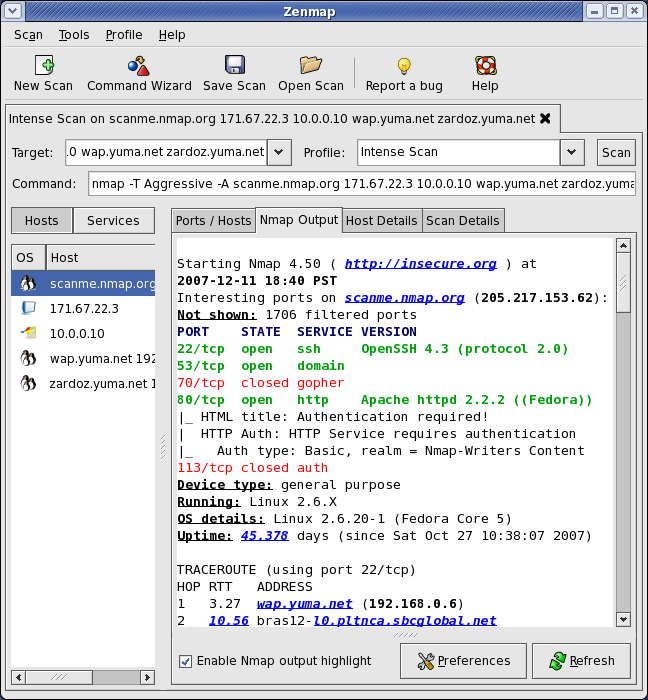
Nmap ("Network Mapper") is a free and open source (license) utility for network discovery and security auditing. Many systems and network administrators also find it useful for tasks such as network inventory, managing service upgrade schedules, and monitoring host or service uptime. Nmap uses raw IP packets in novel ways to determine what hosts are available on the network, what services (application name and version) those hosts are offering, what operating systems (and OS versions) they are running, what type of packet filters/firewalls are in use, and dozens of other characteristics. It was designed to rapidly scan large networks, but works fine against single hosts. Nmap runs on all major computer operating systems, and official binary packages are available for Linux, Windows, and Mac OS X. In addition to the classic command-line Nmap executable, the Nmap suite includes an advanced GUI and results viewer (Zenmap), a flexible data transfer, redirection, and debugging tool (Ncat), a utility for comparing scan results (Ndiff), and a packet generation and response analysis tool (Nping).

Nmap runs on all versions of Windows since NT, including 2K, XP, Vista, Windows 7, and Server 2003/2008. Please read the Windows section of the Install Guide for limitations and installation instructions for the Windows version of Nmap. In particular, read about the special Windows 2000 (Win2K) dependencies if you use that platform. You can choose from a self-installer (includes dependencies and also the Zenmap GUI) or the much smaller command-line zip file version.
The Nmap executable Windows installer can handle WinPcap installation, registry performance tweaks, and decompressing the executables and data files into your preferred location. It also includes the Zenmap graphical frontend. Skip all the complexity of the Windows zip files with a self-installer:
Latest release self-installer: nmap-6.25-setup.exe
We have written post-install usage instructions. Please notify us if you encounter any problems or have suggestions for the installer.
For those who prefer the command-line zip files (Installation Instructions; Usage Instructions), they are still available. The Zenmap graphical interface is not included with these, so you need to run nmap.exe from a DOS/command window. Or you can download and install a superior command shell such as those included with the free Cygwin system. Also, you need to run the Winpcap and Microsoft Visual C++ Redistributable Packageinstallers which are included in the zip file. The main advantage is that these zip files are a fraction of the size of the executable installer:
Latest command-line zipfile: nmap-6.25-win32.zip
***********
네트워크 관련 오픈소스 유틸리티